%20{%20.logo-h%20{%20fill:%20transparent;%20/*%20No%20fill,%20just%20the%20outline%20*/%20stroke:%20%23222222;%20/*%20Dark%20stroke%20for%20visibility%20*/%20stroke-width:%2010px;%20/*%20Slightly%20thicker%20stroke%20for%20better%20visibility%20*/%20}%20}%20/*%20For%20dark%20mode%20only%20*/%20@media%20(prefers-color-scheme:%20dark)%20{%20.logo-h%20{%20fill:%20%23ffffff;%20stroke:%20rgba(255,%20255,%20255,%200);%20/*%20Transparent%20stroke%20for%20dark%20mode%20*/%20}%20}%20%3c/style%3e%3cpath%20class='logo-h'%20d='M128,96%20v320%20h64%20v-128%20h128%20v128%20h64%20v-320%20h-64%20v128%20h-128%20v-128%20z'/%3e%3c!--%20Red%20to%20cyan%20gradient%20line%20with%20upward%20Texas%20Longhorn-style%20curve%20--%3e%3clinearGradient%20id='gradient'%20x1='0%25'%20y1='0%25'%20x2='100%25'%20y2='0%25'%3e%3cstop%20offset='0%25'%20style='stop-color:%23ef4444;stop-opacity:1'%20/%3e%3cstop%20offset='100%25'%20style='stop-color:%2306b6d4;stop-opacity:1'%20/%3e%3c/linearGradient%3e%3c!--%20Texas%20Longhorn%20style%20curved%20path%20pointing%20upward%20--%3e%3cpath%20d='M96,448%20C120,470%20170,455%20256,440%20C342,455%20392,470%20416,448%20L416,432%20C392,450%20342,435%20256,420%20C170,435%20120,450%2096,432%20Z'%20fill='url(%23gradient)'/%3e%3c/svg%3e)
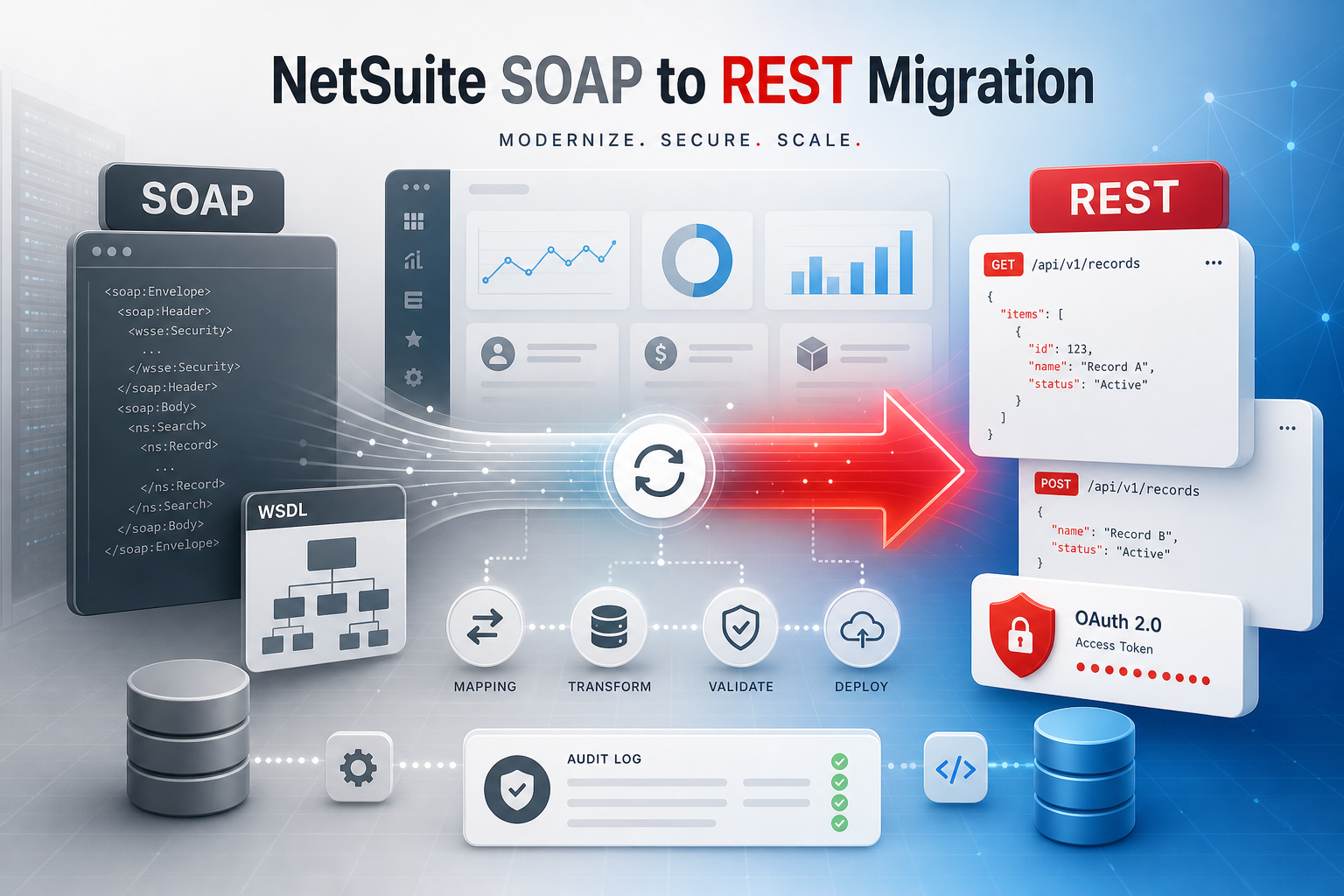
If your business depends on NetSuite integrations built on SuiteTalk SOAP web services, Oracle has set a deadline. SOAP is being retired in favor of SuiteTalk REST with OAuth 2.0—and the timeline is closer than most teams realize.
This guide walks through what is changing, the official deprecation schedule, who needs to act, and the pitfalls that break migrations in production. If you already know you need help, our NetSuite SOAP to REST migration services page covers how we audit, rebuild, and cut over live integrations.
NetSuite integration work we have done before
NetSuite is not a platform we read about and quote back. It is on our integrations roster because we have wired it into real operations—syncing customers, orders, inventory, and custom records between NetSuite and CRM, WMS, e-commerce, and internal tools.
- SuiteTalk SOAP-to-REST migrations for distribution and manufacturing ops teams retiring WSDL-based syncs
- OAuth 2.0 rebuilds replacing token-based auth across middleware, scheduled jobs, and partner connectors
- RESTlet bridges where REST parity was not ready but the business could not wait on Oracle’s roadmap
- Parallel-run cutovers reconciling SOAP and REST outputs on live transactions before switching traffic
- Downstream ERP sync keeping HubSpot, Shopify, ShipStation, and internal dashboards aligned with NetSuite as the source of truth
The migrations that go smoothly are not the ones with the cleanest WSDL. They are the ones where someone has already seen what breaks when custom fields, subsidiaries, and record types do not map the way the upgrade guide implies.Jeremy LaRose, Herd of Nerds
What is changing
SuiteTalk SOAP web services have been NetSuite’s primary integration channel for years. They use XML payloads, WSDL-defined operations, and token-based authentication (TBA). Oracle is now directing all new integration work toward SuiteTalk REST web services with OAuth 2.0—a lighter, JSON-based API that aligns with modern security and architecture standards.
The shift is not cosmetic. REST uses different record shapes, different auth flows, and different error patterns than SOAP. Some legacy SOAP operations will not be exposed in REST at all—those gaps require SuiteScript RESTlets instead.
The official deprecation timeline
Oracle has published a phased removal schedule. Here are the milestones that matter for planning:
- 2025.2 release — The last regularly planned SOAP endpoint. Any later SOAP endpoints would only be released for significant business or technical requirements.
- 2026.1 release — All newly built integrations should use REST web services with OAuth 2.0. New SOAP endpoints are no longer routinely created.
- 2027.1 release — You will not be able to build any new integrations using SOAP web services.
- 2027.2 release — Only the last SOAP endpoint receives bug fixes. Older endpoints remain available but are no longer supported.
- 2028.2 release — SOAP web services are fully removed. Any remaining SOAP integrations will stop working.
The practical takeaway: you have a window, but it is not unlimited. Teams that start inventorying and migrating now can cut over methodically. Teams that wait until 2028.2 will be scrambling under pressure.
Common pitfalls that break SOAP-to-REST migrations
These are the failures we see on intake—not from Oracle’s docs, but from live accounts where a migration already went sideways or is about to:
Treating REST as a straight SOAP port
Teams rewrite XML calls to JSON without rethinking record shapes, custom field IDs, or subsidiary scoping. The integration runs—but creates duplicates, drops line items, or writes to the wrong account.
Skipping the SOAP inventory
Scheduled scripts, Celigo flows, and one-off middleware jobs hide in production. A migration plan that only covers the “main” connector misses the job that creates customers at 2am.
OAuth 2.0 bolted on at the end
Token refresh, role scoping, and integration record setup need to be designed upfront. Auth failures at scale look like random sync outages—not an obvious credential problem.
Big-bang cutover on every path at once
Finance, fulfillment, and inventory integrations all switch the same weekend. When one path fails, nobody knows which rollback lever to pull first.
Assuming REST parity is complete
Oracle is closing gaps fast, but some legacy SOAP operations will never appear in REST. Teams discover this in UAT—not during the audit—when a critical write path has no REST equivalent.
No reconciliation trail after go-live
Without external IDs, payload logs, and replay queues, finance cannot answer why a number in NetSuite does not match CRM or the warehouse. Silent partial syncs are worse than a hard failure.
We plan around these pitfalls explicitly—inventory first, one path at a time, parallel-run with reconciliation, RESTlets scoped only where REST is not enough. That is the difference between a migration project and a production incident.
NetSuite migration specialists
Already behind on the SOAP-to-REST timeline?
We audit live NetSuite integrations, map SOAP calls to REST or RESTlet paths, and cut over one workflow at a time—so finance and ops stay online while you migrate.
Request a migration auditWho is affected
Any organization with custom or third-party integrations that call NetSuite via SOAP is in scope. Common scenarios include:
- Custom middleware that syncs customers, orders, or inventory between NetSuite and CRM, WMS, or e-commerce platforms
- Scheduled SuiteScript or external scripts that use SOAP endpoints for record creation and updates
- iPaaS connectors (Celigo, Boomi, Workato, etc.) configured for SOAP rather than REST
- Partner-built integrations where the vendor has not yet published a REST-based replacement
- Internal tools and dashboards that pull NetSuite data through SOAP calls
Oracle-managed solutions and connectors that Oracle updates on your behalf may transition automatically—but custom-built and partner-specific integrations are your responsibility.
What migration actually involves
A SOAP-to-REST migration is not a find-and-replace exercise. Each integration path needs to be understood, mapped, rebuilt, and validated. Here is what that looks like in practice.
1. Inventory every SOAP integration
Start with a complete list: every SOAP endpoint your systems call, every scheduled script, every third-party connector. For each one, document the record types involved, the direction of sync (inbound, outbound, or both), how often it runs, and what breaks if it stops.
2. Map SOAP operations to REST equivalents
Oracle publishes a SOAP Web Services to REST Web Services Upgrade Guide that maps operations between the two APIs. Most common record types—customers, sales orders, invoices, items, vendors—already have REST equivalents. Where REST lacks an operation, plan a SuiteScript RESTlet as a targeted bridge rather than trying to force-fit SOAP logic.
3. Rebuild auth on OAuth 2.0
SOAP integrations typically use token-based authentication (TBA). REST requires OAuth 2.0 with client credentials or authorization code flows. That means new integration records in NetSuite, new credential management, and updated auth handling in every calling system.
4. Handle parity gaps with RESTlets
Oracle is investing heavily in REST parity, but 100% parity is not the goal—some legacy SOAP functionality was deprecated for good reason and will not appear in REST. When a specific operation you depend on is missing, a SuiteScript RESTlet can expose exactly what you need without waiting for Oracle to close the gap.
5. Parallel-run and reconcile
The safest cutover runs SOAP and REST side by side on real transactions. Compare outputs—record counts, field values, edge cases—before switching traffic. Keep SOAP available as a rollback path for at least two weeks after cutover.
How to plan the cutover
Do not try to migrate everything at once. Rank integrations by business impact and migration complexity, then tackle them in order:
- Start with the highest-risk, lowest-complexity path — often a single record type in one direction, like customer sync from CRM to NetSuite
- Validate on production-like data — test with real record volumes and edge cases, not just happy-path samples
- Cut over one integration at a time — each successful migration builds confidence and a reusable pattern for the next
- Monitor error queues aggressively — failed records should land in a review queue with enough context to fix and replay, not fail silently
- Document the new REST patterns — so the next developer (or the next integration) does not have to rediscover auth, rate limits, and field mappings from scratch
When to bring in NetSuite migration specialists
Migration is tractable if you have someone on staff who knows both your integration landscape and NetSuite’s REST API. Most teams do not—and that is normal. Bring in specialists when:
- The original SOAP developer is gone and nobody fully understands what the integrations do
- You have more than three integration paths touching NetSuite and no dedicated integration engineer
- Finance or fulfillment cannot tolerate downtime during the cutover window
- REST parity gaps require RESTlet development your team has not done before
- A prior migration attempt already created duplicates or data drift and you need a reconciliation plan before going further
- You are also mid-flight on other NetSuite work (SuiteScript 2.x upgrades, new modules) and cannot absorb another large project
We have run this playbook on live NetSuite accounts—the same approach we use for broader API integration work: audit first, migrate one path, validate against real data, then expand. A focused first milestone—one record type, one direction, with logging and error handling—often lands between $2k–$20k depending on complexity.
The bottom line
NetSuite SOAP web services are not going away tomorrow, but they are going away. The 2028.2 full removal date is firm, and the restrictions tighten with every release between now and then. Teams that inventory their SOAP integrations now and start migrating to REST with OAuth 2.0 will cut over calmly. Teams that wait will be doing it under pressure—with finance, ops, and leadership watching every failed sync.
If you want a team that has already migrated SuiteTalk SOAP integrations—not just read the upgrade guide—request a NetSuite migration audit. We will map what you have, flag the highest-risk paths, and outline a realistic cutover sequence.