%20{%20.logo-h%20{%20fill:%20transparent;%20/*%20No%20fill,%20just%20the%20outline%20*/%20stroke:%20%23222222;%20/*%20Dark%20stroke%20for%20visibility%20*/%20stroke-width:%2010px;%20/*%20Slightly%20thicker%20stroke%20for%20better%20visibility%20*/%20}%20}%20/*%20For%20dark%20mode%20only%20*/%20@media%20(prefers-color-scheme:%20dark)%20{%20.logo-h%20{%20fill:%20%23ffffff;%20stroke:%20rgba(255,%20255,%20255,%200);%20/*%20Transparent%20stroke%20for%20dark%20mode%20*/%20}%20}%20%3c/style%3e%3cpath%20class='logo-h'%20d='M128,96%20v320%20h64%20v-128%20h128%20v128%20h64%20v-320%20h-64%20v128%20h-128%20v-128%20z'/%3e%3c!--%20Red%20to%20cyan%20gradient%20line%20with%20upward%20Texas%20Longhorn-style%20curve%20--%3e%3clinearGradient%20id='gradient'%20x1='0%25'%20y1='0%25'%20x2='100%25'%20y2='0%25'%3e%3cstop%20offset='0%25'%20style='stop-color:%23ef4444;stop-opacity:1'%20/%3e%3cstop%20offset='100%25'%20style='stop-color:%2306b6d4;stop-opacity:1'%20/%3e%3c/linearGradient%3e%3c!--%20Texas%20Longhorn%20style%20curved%20path%20pointing%20upward%20--%3e%3cpath%20d='M96,448%20C120,470%20170,455%20256,440%20C342,455%20392,470%20416,448%20L416,432%20C392,450%20342,435%20256,420%20C170,435%20120,450%2096,432%20Z'%20fill='url(%23gradient)'/%3e%3c/svg%3e)
Most contractors do not lose money because they forgot how to do the work. They lose money in the handoffs: lead comes in, quote gets built in a spreadsheet, someone texts the crew, QuickBooks gets updated later, and the office spends Friday trying to figure out what actually happened.
This is a representative walkthrough of the kind of custom CRM for contractors and custom quoting tool we build for service businesses that have outgrown shared spreadsheets and generic job software. The screens below are mockups, but the workflow is based on the real problems we see over and over: missed follow-ups, slow estimates, messy job handoffs, and duplicate data entry.
The problem: the job was scattered before it even started
The old workflow looked normal from the outside. Leads came in from the website, referrals, phone calls, and repeat customers. Someone in the office wrote notes in a spreadsheet. Quotes were built in another spreadsheet. Job details went to the crew through texts. When the customer said yes, someone had to copy the same details into the schedule, then later into QuickBooks.
Nothing about that is unusual. That is the point. A lot of contractors run this way until the business gets busy enough that the cracks become expensive.
- Follow-ups slipped because there was no single queue showing which quotes needed a call today
- Quotes took too long because pricing rules, package options, and margin checks lived in someone’s head
- Job handoffs were incomplete because the crew got a summary, not the full estimate context
- Invoices lagged behind completed work because field updates did not flow back to the office cleanly
- Owners had no clear dashboard for quote volume, open jobs, and stuck follow-ups
What we built first: one CRM screen the office could trust
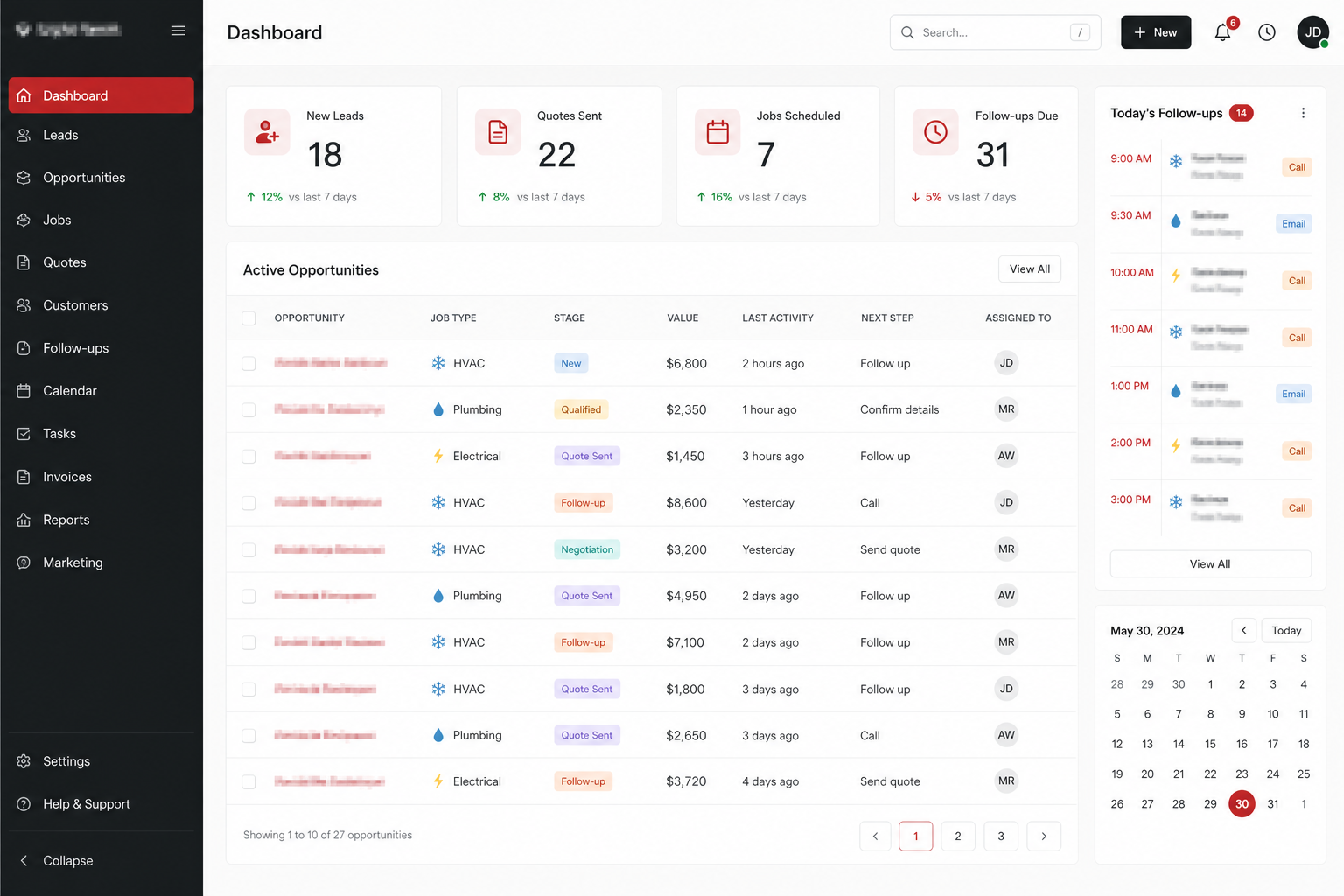
We did not start with every feature a contractor might someday want. We started with the daily office rhythm: what came in, what needs a quote, what needs a follow-up, and what is already scheduled. The first useful screen was a CRM dashboard with four numbers the team could act on right away.
The lead and opportunity table tracks job type, stage, value, last activity, next step, and owner. That sounds basic, but for a contractor moving from spreadsheets, the real value is that nobody has to ask which tab is current. The system tells the office what needs attention.
The quote builder: faster estimates without hiding the math
The quoting screen replaces the spreadsheet that everyone was afraid to touch. It still feels familiar: line items, quantities, labor, material, package options, and a total. But the business rules are built into the workflow instead of buried in formulas.
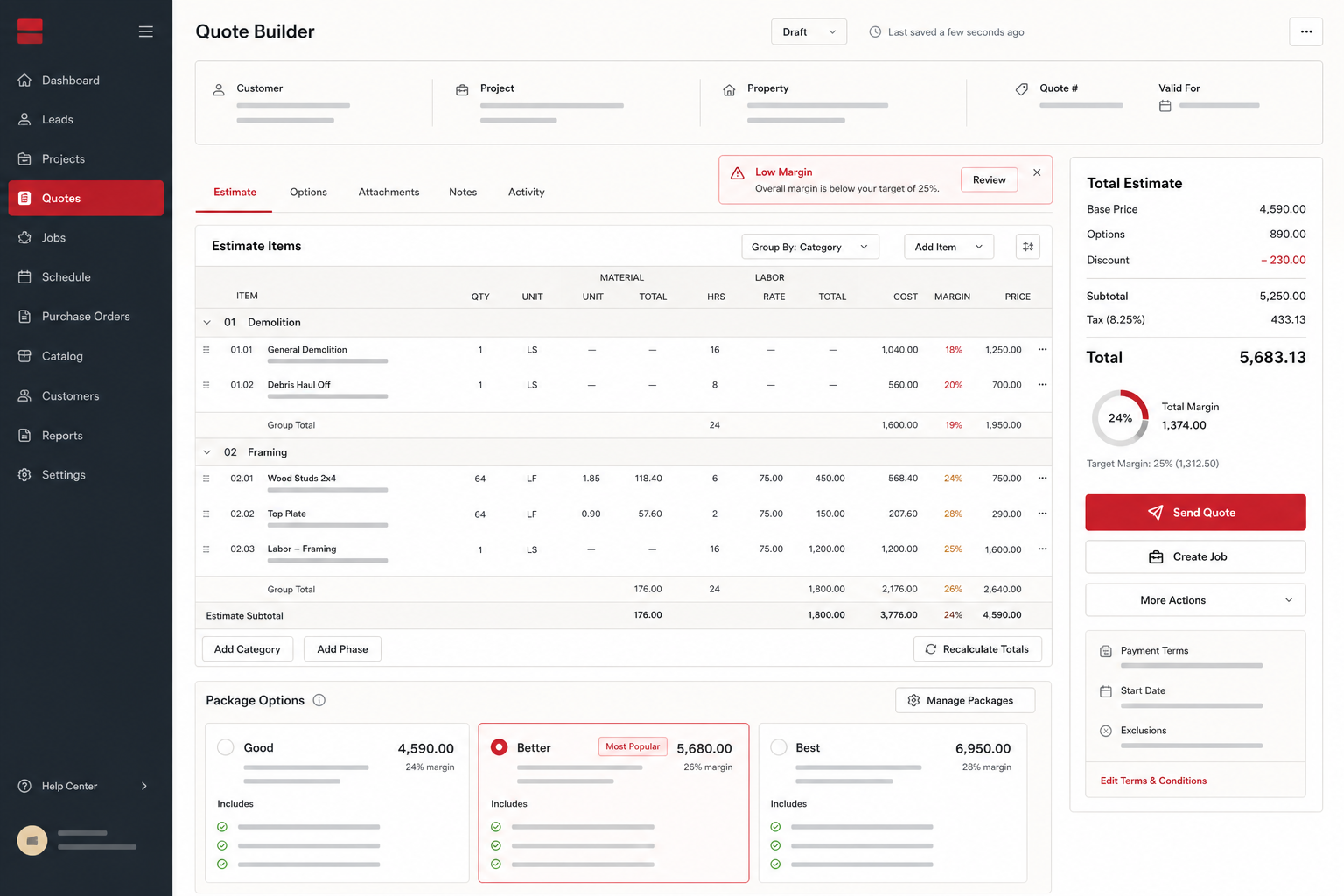
For this kind of build, we usually add guardrails where mistakes cost money: low-margin warnings, required fields before sending, package options that sales can explain, and a clean handoff from accepted quote to scheduled job. The goal is not to make quoting fancy. The goal is to make quoting repeatable.
The handoff: closed-won should not mean “copy this into three places”
The most important screen is often the least glamorous one: the handoff. When a quote is accepted, the system should know what needs to happen next. Confirm the scope. Assign the crew. Pick a start date. Draft the invoice. Flag missing permits, gate codes, or site notes before the crew is in the driveway.
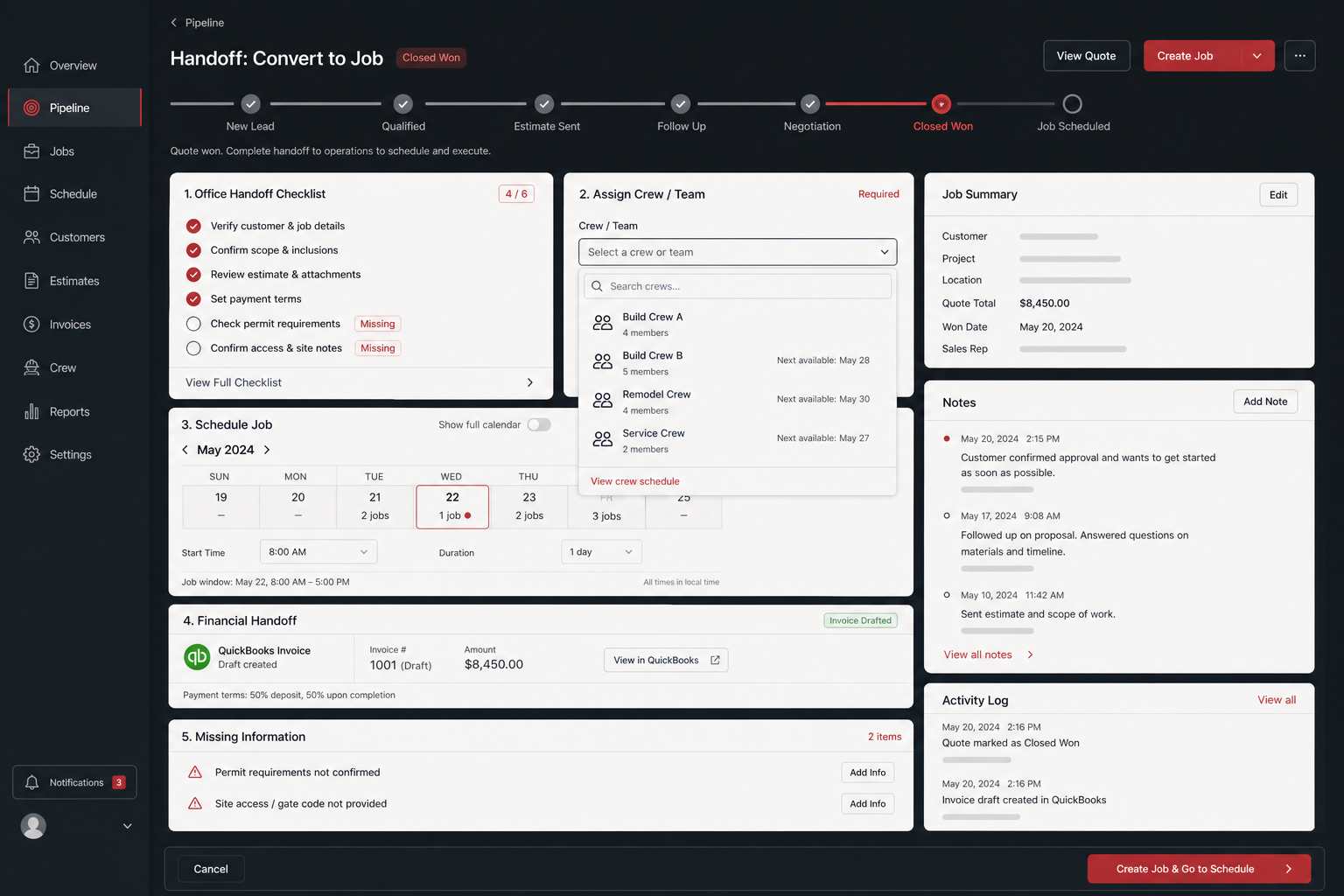
This is where custom software earns its keep. Generic tools can track a job. A custom workflow can match the exact way your office hands work to the field, including the awkward exceptions that actually slow you down.
The field view: crews update the job without calling the office
The field view is intentionally smaller. Techs and crews do not need the full CRM. They need today’s jobs, job details, status buttons, photo upload, parts used, and a completion step. If the mobile screen takes more training than a text message, it will not get used.
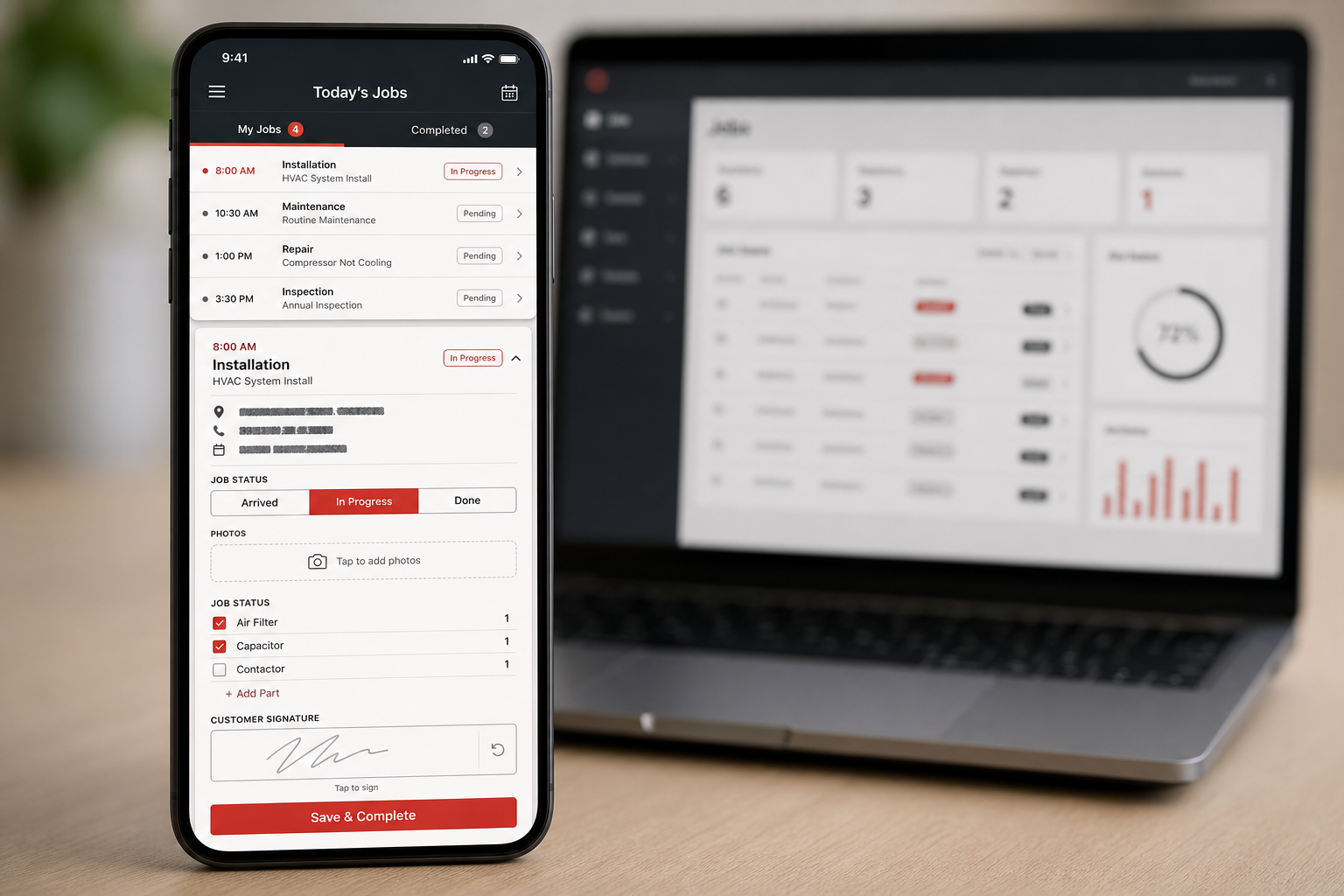
When the crew marks a job done, the office gets the data it needs for invoicing and follow-up. No one has to decode a text thread. No one has to ask whether the work is complete. The job record becomes the place everyone checks.
What changed for the business
The immediate win is usually not some dramatic company-wide transformation. It is quieter and more useful: quotes go out faster, follow-ups stop getting missed, job details survive the sales-to-ops handoff, and invoicing starts from completed job data instead of handwritten notes.
- Estimate time drops because common line items, package options, and margin checks are built in
- Follow-up discipline improves because the CRM shows who needs a call or email today
- Office-to-field handoffs get cleaner because accepted quotes become structured jobs
- Billing moves faster because completion details and parts used are captured in the job record
When custom beats another contractor SaaS subscription
Off-the-shelf contractor software is a good fit when your process is simple and you are willing to work the way the platform expects. Custom starts making sense when your quote math, handoff steps, crew rules, or accounting flow are the part of the business you cannot afford to bend. If that sounds familiar, our custom job tracking software and custom software for small business pages explain the build path in more detail.
The best first milestone is narrow: lead intake, quoting, and job handoff for one team. Get that working. Let the office trust it. Then add scheduling, QuickBooks sync, dashboards, or field reporting once the workflow is already paying for itself.